on
on
คนที่เคยใช้เครื่องมือ AI ช่วยเขียนโค้ดคงรู้จักกับคำว่า "vibe code" หรือการเขียนโค้ดแบบชิวๆ อยากได้อะไรก็พิมพ์สั่ง AI เอา ไม่ต้องลงโค้ดเอง สิ่งนี้กำลังจะเกิดขึ้นกับงานเอกสารในสำนักงาน ซึ่งไมโครซอฟท์เรียกมันว่า "vibe work"
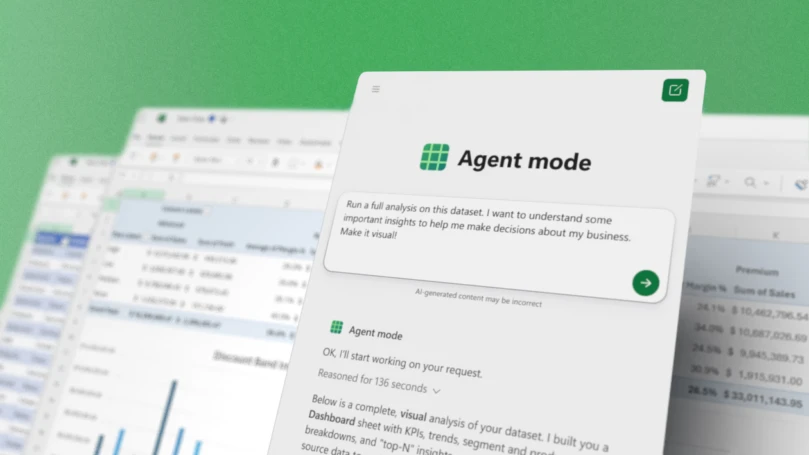
ไมโครซอฟท์เปิดตัว Agent Mode ใน Microsoft Word และ Excel (PowerPoint จะตามมาในลำดับถัดไป) ที่รองรับการพิมพ์สั่งงาน prompt แล้วได้ผลลัพธ์ออกมาทันที
ตัวอย่างเช่น
Excel
- Financial Analysis Prompt Create a financial monthly close report for a bike shop business, including a breakdown of product lines across VTB, VTF, sequential, and year-over-year growth. Use standard financial formatting and best practices.
- Personal Budgeting Prompt Create a monthly household budget tracker with categories like Rent, Groceries, Utilities, Entertainment, Transportation, and Savings. Apply conditional formatting and data bars for % Over/Under Budget. Add a summary section showing planned versus actual spending with a donut chart to visualize spending distribution.
Word
- Monthly Report Update Prompt Help me update this monthly report for September. Update the data table with the latest numbers from the /Sept Data Pull email. Summarize the key highlights including insights compared to last month’s /August monthly report.doc.
- Project Update Prompt Update the executive summary for clarity, bold all key findings, and insert a bulleted list of next steps based on the /Project update meeting. Make sure to add a conclusion.
- Document Style Prompt Can you clean up this document? Title case for section headers, branding updates per the ‘/Latest brand guidelines’ email, and italicize all external partner mentions. Feel free to ask if you need help identifying partners or guidelines.
3/ And Agent Mode in Word can re-style, summarize, or expand your writing right inside your doc, so you stay in your flow. pic.twitter.com/dAbC8QH3xo
— Satya Nadella (@satyanadella) September 29, 2025
เบื้องหลังการทำงานของ Agent Mode คือการใช้โมเดล GPT-5 ทำงานหลายอย่างประสานงานกัน เช่น ระบบ reasoning engine ทำหน้าที่วางแผน, ตัวสร้างเอกสารขึ้นมาตอนแรก, ตัวอัพเดตข้อมูลในตาราง Excel, ตัวเรียกใช้เครื่องมือภายนอก ฯลฯ
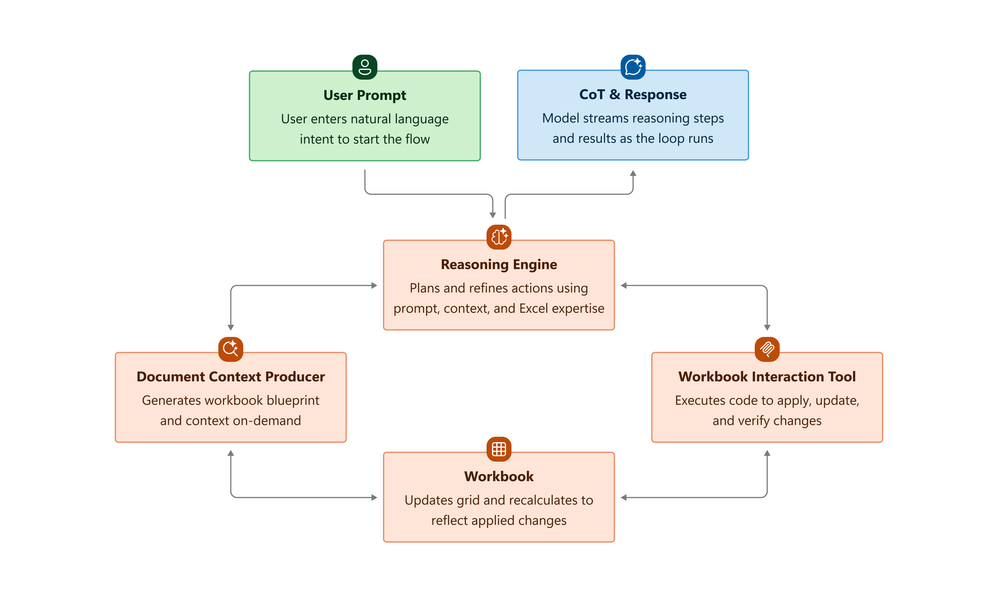
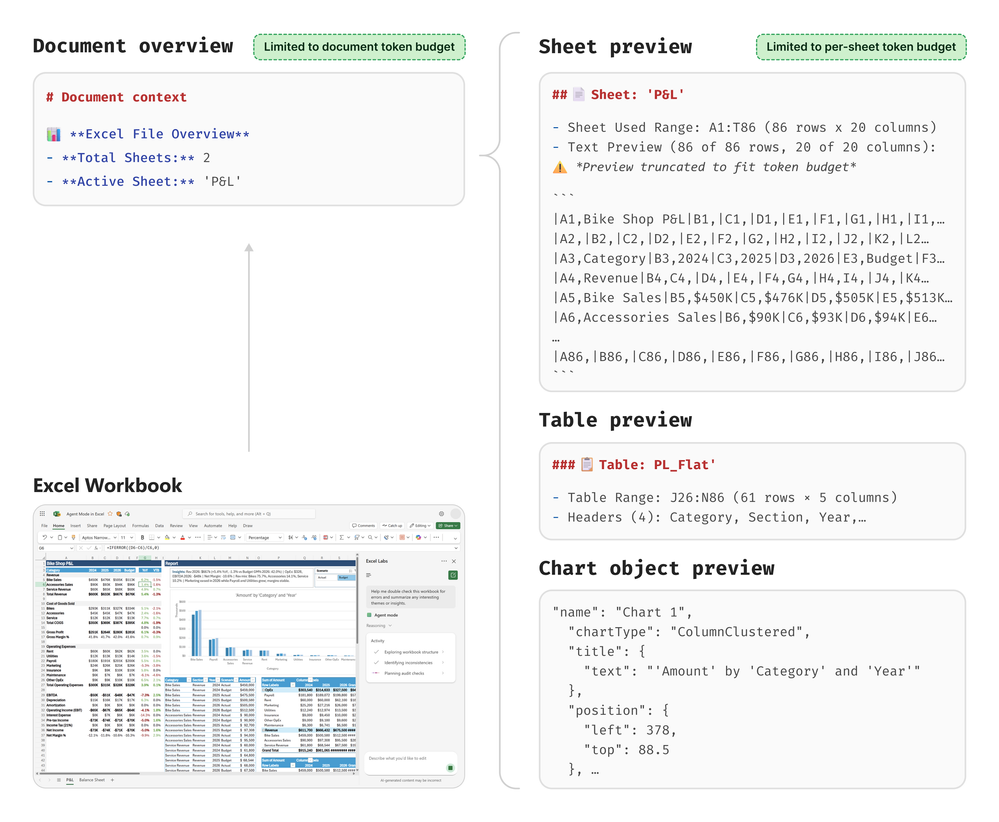
ไมโครซอฟท์อธิบายเบื้องหลังการสร้าง Agent Mode ว่าต้องปรับปรุงเอนจินเบื้องหลังของ Excel ใหม่ เพราะโครงสร้างไฟล์ workbook และ API ของ Excel ที่สั่งสมมาหลายสิบปี นั้นซับซ้อนเกินกว่าที่โมเดลในปัจจุบันจะจัดการได้ทั้งหมด สิ่งที่ไมโครซอฟท์สร้างขึ้นมาใหม่คือ document context producer ที่เลือกข้อมูลเฉพาะบางส่วนที่จำเป็นต้องใช้กับบริบทนั้นๆ ออกมาให้โมเดลดูก่อน หากจำเป็นต้องขุดลงลึกเข้าไปในเอกสารค่อยดึงข้อมูลเพิ่มเติมออกมาทีละส่วน
ฟีเจอร์ Agent Mode ใน Excel และ Word เริ่มเปิดทดสอบแล้ววันนี้กับลูกค้า Microsoft 365 Copilot, Microsoft 365 Personal, Microsoft 365 Family โดยต้องสมัครเข้ากลุ่มทดสอบ Frontier Program ก่อน และตอนนี้ยังรองรับเฉพาะ Excel และ Word เวอร์ชันเว็บ โดยเวอร์ชันเดสก์ท็อปจะตามมาต่อไป