
 on
on
เรื่องทั้งหมดมันสืบเนื่องมาจากความขี้เกียจเวลาจะรีวิวลง Blognone สักที ทั้งหมดที่ผมอยากได้คือโปรแกรมที่ดักรอ Clipboard แล้วส่งเข้า Picasa แล้วเอาโค้ดมา embed ได้ทันที
ปัญหามีอย่างเดียว...
ผมไม่เคยเขียน GUI!!! ตอนป. ตรีทำงานกลุ่มก็โยนให้เพื่อนออกแบบหน้าจอ ผมเขียนไส้ในอย่างเดียว
เลยมาลองคลำๆ ดูอยู่สองวันก็ได้เจ้านี่ออกมา
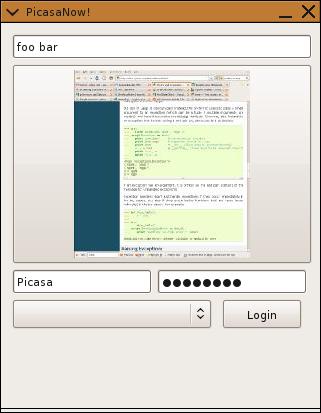
(ภูมิใจมาก เพราะภาพนี้อัพโหลดขึ้น Picasa ด้วยตัวมันเอง)
ขั้นตอนการใช้งานก็มี
- ใส่ Username / Password กด Login
- เลือก Album หลังจาก Login แล้ว
- โปรแกรมจะดักรอ clipboard เราไปเรื่อยๆ ทุก 5 วินาที
- กดที่ภาพเมื่อได้ภาพที่ต้องการจะอัพโหลด
- กดที่ Text box ด้านบนเพื่อคัดลอกข้อความเข้า Clipboard โดยไม่ได้กด CTRL+C
- เอาไปวางตามใจชอบ
# Copyright (c) 2009 by Wason Liwlompaisan

#

# GNU General Public Licence (GPL)

#

# This program is free software; you can redistribute it and/or modify it under

# the terms of the GNU General Public License as published by the Free Software

# Foundation; either version 2 of the License, or (at your option) any later

# version.

# This program is distributed in the hope that it will be useful, but WITHOUT

# ANY WARRANTY; without even the implied warranty of MERCHANTABILITY or FITNESS

# FOR A PARTICULAR PURPOSE.  See the GNU General Public License for more

# details.

# You should have received a copy of the GNU General Public License along with

# this program; if not, write to the Free Software Foundation, Inc., 59 Temple

# Place, Suite 330, Boston, MA  02111-1307  USA

#
from PythonCard import model,clipboard,timer
import wx
import tempfile as tf
import Image
import threading
import gdata.photos.service
import gdata.media
import time
import sys
class MyBackground(model.Background):
def on_initialize(self, event):
    # if you have any initialization
    # including sizer setup, do it here
    self.tmp_dir = tf.mkdtemp()
    self.gclient = None
    self.full_name = self.tmp_dir+"/curfile.jpg"
    self.thumb_name = self.tmp_dir+"/icon.jpg"
    self.clipboardTimer = timer.Timer(self.components.ImagePlace,-1)
    self.clipboardTimer.Start(5000)

def on_ImagePlace_timer(self,event):
    size = 300,200
    print "Fired"
    try:
        print "process"
        img = clipboard.getClipboard()
        img.SaveFile(self.full_name,wx.BITMAP_TYPE_JPEG)
        im = Image.open(self.full_name)
        im.thumbnail(size)
        im.save(self.thumb_name,"JPEG")
        self.components.ImagePlace.file = self.thumb_name
    except:
        print "Error" , sys.exc_info()[0]
        pass

def on_TextMe_gainFocus(self,event):
    clipboard.setClipboard(self.components.TextMe.text)
    print "yeshoo"
    self.components.TextMe.SetFocus()
    self.components.TextMe.SetSelection(-1,-1)

def on_TextMe_mouseDown(self,event):
    self.components.TextMe.SetFocus()
    self.components.TextMe.SetSelection(-1,-1)


def on_ImagePlace_mouseClick(self, event):
    if self.gclient == None:
        self.components.TextMe.text = "Please Login."
        return
    photo = self.gclient.InsertPhotoSimple("/data/feed/api/user/default/albumid/"+self.albums[self.components.AlbumName.stringSelection],"Simple Photo","Upload via API",self.full_name,content_type='image/jpeg')
    link_text = '<a href="%s"><img src="%s" /></a>' % (photo.GetHtmlLink().href, photo.GetMediaURL())
    self.components.TextMe.text = link_text

def on_Login_mouseClick(self,event):
    if self.gclient == None:
        self.gclient = gdata.photos.service.PhotosService()
        self.gclient.email = self.components.Username.text
        self.gclient.password = self.components.Password.text
        self.gclient.source = "PicasaNow! 0.1"
        try:
            self.components.TextMe.text = "Login success. Now ,select you album to upload to."
            self.gclient.ProgrammaticLogin()
        except:
            self.gclient = None
            self.components.TextMe.text = "Login error"
            return
    albums = self.gclient.GetUserFeed(user=str(self.components.Username.text))
    self.albums={}
    for album in albums.entry:
        self.components.AlbumName.append(album.title.text)
        self.albums[album.title.text]=album.gphoto_id.text

def on_AlbumName_select(self,event):
    print self.components.AlbumName.stringSelection
if name == 'main':
app = model.Application(MyBackground)
app.MainLoop()
ตัวโปรแกรมสร้างจาก Pythoncard ต้องใช้ resource file อีกอัน
{'application':{'type':'Application',

'name':'Template',

'backgrounds': [

{'type':'Background',

'name':'bgTemplate',

'title':u'PicasaNow!',

'size':(319, 385),
'components': [
{'type':'Button',
'name':'Login',
'position':(220, 275),
'size':(80, 30),
'label':'Login',
},
{'type':'Choice',
'name':'AlbumName',
'position':(10, 275),
'size':(200, 30),
'items':[],
},
{'type':'TextField',
'name':'Username',
'position':(10, 245),
'size':(140, 25),
'text':'Picasa',
},
{'type':'PasswordField',
'name':'Password',
'position':(155, 245),
'size':(150, 25),
'text':'memenono',
},
{'type':'ImageButton',
'name':'ImagePlace',
'position':(10, 40),
'size':(300, 200),
'border':'none',
'file':'03-10CBFOB_lg.jpg',
},
{'type':'TextField',
'name':'TextMe',
'position':(10, 10),
'size':(300, 25),
'text':'foo bar',
},
] # end components
} # end background
] # end backgrounds
} }


























